how to fix overexpose or underexpose photos
Not every photo we take is a good photo, sometimes its overexpose or underexpose photos. This video tutorial will teach us how to fix overexpose or underexpose photos.

Not every photo we take is a good photo, sometimes its overexpose or underexpose photos. This video tutorial will teach us how to fix overexpose or underexpose photos.
This photoshop tutorial video will show you how to add digital tattoos to your body. Put the tatto where do you want it to show off. Apply a liitle bit gaussian blur, set up hue and saturation to match with the skin color, and finally use layer blend mode to blend it more to the skin. This tutorial brought by IceflowStudios
In this tutorial you'll learn how to create fake depth of field with Photoshop. Depth of field is the amount of distance between the nearest and farthest objects that appear in acceptably sharp focus in a photograph. But not all of our photograph was taken according to this method, sometimes we need to fake depth of field with photoshop.
Today's word:
Student Loan Consolidation:
Student Loan Consolidation is a practical repayment tool that refinances your school loans into one loan, significantly reducing your monthly payment. Take a look at how much you can save each month with our student loan consolidation calculator.
We all know that actress and actors look perfect on poster. This Photoshop video tutorial will help you understand how they did a beauty retouching on someone face. This tutorial you will learn how to remove pimple, how to smoothing the skin, how to correcting the skin tone, how to remove the unwanted object, how to add some light effect, ect.
Did You ever want to remove something from your photo? things that You don't want be there?
Well,..Photoshop's Clone Stamp Tool is one of Photoshop's most powerful tools.
The Cloning Stamp Tool does exactly what its name implies. Using this tool, you can copy a portion of an image and reapply it repeatedly to cover an unwanted portion of the image. Using this relatively simple concept, though, you can actually cover a lot of ground when it comes to editing or repairing your digital photographs.
The original title of this video was "07 Photoshop CS3-Remove person from Background" and uploaded by vcampi77 . In this video you'll learn how to use quick selection tool new features in photoshop CS3.
Back in September 2007, people were talking about Britney Spears comeback performance up the 2007 Video Music Awards in a bejeweled bra and panties, performing her single “Gimme More.” Some of them said that was her horrible hair and worst outfit ever!, so lllForBiddeNlll had to "retouch" her with the new outfit and hair.
I hope you enjoy it :)
You might wanna see this:
1. Adobe Photoshop CS3 for Photographers by Martin Evening.
2. The Photoshop Channels Book by Scott Kelby.
3. Adobe Photoshop Unmasked: The Art and Science of Selections, Layers, and Paths by Nigel French.
4. Photoshop Masking & Compositing by Katrin Eismann.
5. Adobe Photoshop CS2 Studio Techniques by Ben Willmore.
You know, ..sometimes they just wont give up...
For some photographer, there is no limit for creativity,...
if they can't shot moving object, so why don't "freeze the time" then :)


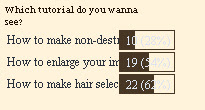 A months ago I did a survey which tutorial you wanna see ? well as the result came out, "how to make hair selection" was no.1 and than I continue with "Photoshop Hair Masking Part 2".
The #2 video that you wanna see was how to enlarge your image :),.... well this video from abacusmage will show you how, this was the technique that I was gonna show you.
Upsizing A Great Image Into A Standard Poster Size
Yap,...this tutorial will turn your photos into Britney Spears look alike. This tutorial was posted by tutorials4ps. Celebrities such as: Britney Spears, Jessica Alba, Jessica Simpson, Kelly Clarkson, Carrie Underwood, Katharine McPhee, etc use this technique to glamourized their photos.
The step is very easy....
1. Duplicate your layer
2. Change the blending mode into overlay
3. Blur it a little bit
4. Click on your mask icon layer
5. Than mask the part that you don't want to be blur
There are many ways to adjusting color and sharpening in photoshop, and I just found one very good technique from DigitalAssassin. I am very recommend you to watch this video, especially if you are a photographer who wants to use photoshop to make your photos look better.
You might wanna see this:
1. Adobe Photoshop CS3 for Photographers by Martin Evening.
2. The Photoshop Channels Book by Scott Kelby.
3. Adobe Photoshop Unmasked: The Art and Science of Selections, Layers, and Paths by Nigel French.
4. Photoshop Masking & Compositing by Katrin Eismann.
5. Adobe Photoshop CS2 Studio Techniques by Ben Willmore.